
Description
Bring your DAM closer to your design work
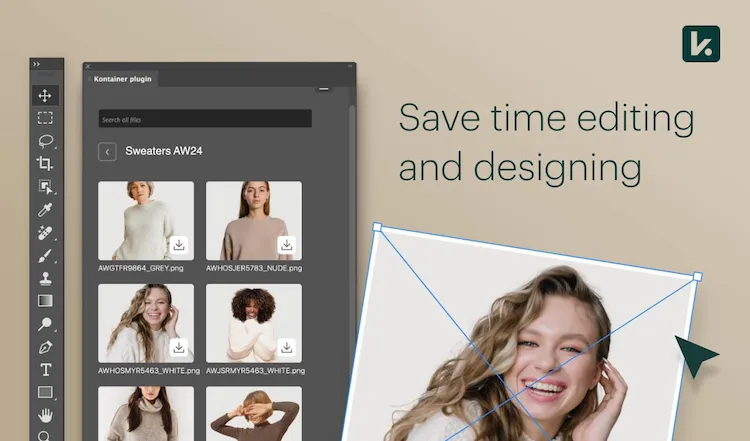
With the Kontainer plugins for the Adobe Creative Cloud apps Adobe Photoshop and Adobe InDesign, your designers can pull assets directly from Kontainer, search using metadata, browse folders, and insert approved files without switching between systems. All assets remain versioned, metadata-enriched, and secured through your access rights.
This plugin solution makes the design workflow smoother while minimizing the risk of using incorrect files.
Benefits
Benefits of the integration
✔ Insert images, logos, and graphics directly into Adobe Photoshop and Adobe InDesign
✔ Search via metadata and filters in Kontainer without leaving Adobe Photoshop or Adobe InDesign
✔ Browse folders and inspiration directly from DAM
✔ Always access the newest, approved versions – avoid unauthorized files
✔ Fewer manual export/import steps, faster workflows
✔ Centralized access control via Kontainer
✔ Ensure consistent brand identity and compliance with brand guidelines
Features
Features of the Kontainer plugins for Adobe Creative Cloud apps
✔ Kontainer plugins for Adobe Photoshop and Adobe InDesign
✔ Configuration via the Kontainer plugin menu in Adobe Photoshop and Adobe InDesign
✔ Option to set a local temporary folder for files
✔ Automatic access through Kontainer URL and plugin verification key
✔ Preview, filter, and search files by name and tags
✔ Automatic synchronization with the latest versions
Why?
Why is connecting your DAM to Adobe Creative Cloud apps important?
Designers and marketing teams often work with large volumes of assets, multiple versions, and varying media needs – and switching between systems creates wasted time and increases the risk of mistakes. With the Kontainer plugins for Adobe Photoshop and Adobe InDesign, file handling moves into the design program itself, reducing friction.
This ensures faster production, higher quality, and brand guidelines compliance at every step.
Use Cases
Typical use cases
- Graphic teams insert logos, images and files directly into Adobe InDesign for brochures and catalogs
- Designers place product images in Adobe Photoshop during campaign production
- Version control ensures projects always use the latest approved files
- Multiple markets can work in parallel with the same file and image library without duplicating files
Support
Links and support
Get in touch with our support team for help with installation, troubleshooting, or best practice advice on the integration.
See the complete installation guide in our Helpdesk here.
Adobe, Adobe Creative Cloud, Adobe InDesign and Adobe Photoshop are either registered trademarks or trademarks of Adobe in the United States and/or other countries.
FAQ
How does the integration work?
The Kontainer plugins for Adobe Creative Cloud apps allow you to access and insert files directly from Kontainer into Adobe Photoshop and Adobe InDesign. You no longer need to switch between systems, making your work faster and more efficient.
Which programs are supported?
The Kontainer plugin is available for Adobe Photoshop and Adobe InDesign.
What do I need to get started?
You’ll need access to a Professional plan (or purchased add-on), create a temporary local folder, and copy a plugin key from your Kontainer user profile. After that, you can activate the Kontainer plugin directly in Adobe Photoshop or Adobe InDesign.
Can I search for files in Kontainer from Adobe Photoshop and Adobe InDesign?
Yes. You can search using metadata, browse folders, and filter your assets directly inside the plugin – so you can quickly find the right files.
How does the integration ensure I’m using the latest files?
The plugin always pulls the most recent, approved versions from Kontainer. This way, you avoid errors and inconsistencies in your design projects.
How are access rights managed?
File access in the Kontainer plugin follows the same permissions you have in Kontainer. This means users can only view and insert the files they are authorized to.