
Description
Professional layout workflows directly from Kontainer
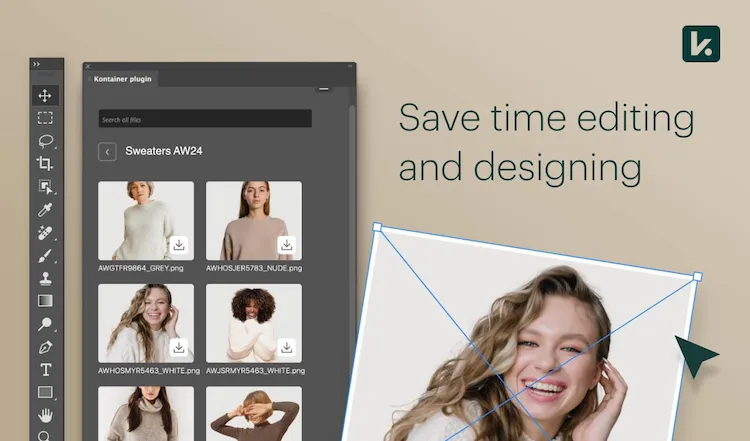
With the Kontainer plugin for Adobe InDesign, designers, marketing teams, and brand managers gain a streamlined workflow. Your assets stored in Kontainer become directly available inside Adobe InDesign, allowing you to drag and drop files straight into your designs without needing to download or re-import them.
This integration ensures version control, access management, and brand consistency – so you always work with the latest and approved files, whether for magazines, brochures, or digital campaigns.
Benefits
Benefits of integrating Kontainer with Adobe InDesign
✔ Insert images and graphics directly from Kontainer DAM into Adobe InDesign
✔ Search and filter assets via metadata, tags, or AI-driven search
✔ Always access the most recent and approved versions
✔ Save time and avoid manual uploads or exports
✔ Automatic version control and live asset updates
✔ Central access control and user management
✔ Secure, fast, and user-friendly integration
Features
Features of the Kontainer plugin for Adobe InDesign
✔ Plugin compatible with current Adobe Creative Cloud versions of Adobe InDesign
✔ Search and preview assets directly from Kontainer
✔ Drag-and-drop functionality from DAM to Adobe InDesign layouts
✔ Live synchronization when assets are updated in Kontainer
✔ Metadata-based search and filtering
✔ Secure single sign-on (SSO) access via Kontainer credentials
Why?
Why integrate Kontainer with Adobe InDesign?
Designers and marketing professionals often spend hours searching for the right images and files. The Kontainer plugin for Adobe InDesign eliminates this hassle.
You work directly in Adobe InDesign with access to your centralized Digital Asset Management (DAM) system – ensuring that all images, logos, and templates are brand-approved and up to date.
This results in faster workflows, fewer errors, and a stronger brand identity across all your marketing and design materials.
Use Cases
Typical Use Cases
- A designer creates a magazine layout and pulls product images directly from Kontainer.
- The marketing team produces campaign materials in Adobe InDesign, with assets automatically sourced from the DAM.
- Global teams adapt local versions of designs – using the same master files to ensure brand consistency.
- The brand department releases new templates in Kontainer, instantly available to all users through the Kontainer panel in Adobe InDesign.
Support
Links and Support
Please contact our support team for help with installation, troubleshooting, or guidance on best practices for the integration.
Please have a look at the complete installation guide in our Helpdesk here.
Adobe, Adobe Creative Cloud, Adobe InDesign and Adobe Photoshop are either registered trademarks or trademarks of Adobe in the United States and/or other countries.
FAQ
How does the integration between Kontainer and Adobe InDesign work?
Once installed, the Kontainer plugin adds a panel in Adobe InDesign where you can log into your Kontainer DAM. From there, you can browse, preview, and insert files directly without switching between windows or folders.
Do files automatically update in Adobe InDesign?
Yes. When a file in Kontainer is updated, you’ll be notified and can refresh it directly in your Adobe InDesign document.
Can I search for files via metadata?
Absolutely. You can search by filename, tags, categories, or metadata to quickly find the right assets for your project.
Do I need special permissions?
No. The plugin uses your existing Kontainer access rights, so you only see and use the files you’re allowed to.
Does the integration work on both Mac and Windows?
Yes, the Kontainer plugin for Adobe InDesign works seamlessly on both macOS and Windows environments.
Which versions of Adobe InDesign are supported?
The integration supports current Adobe Creative Cloud versions of Adobe InDesign.
Can I work offline?
You need to be online to fetch files from Kontainer, but once assets are inserted, you can continue working offline.
Is setup assistance available?
Yes – the Kontainer support team can help with installation, configuration, and onboarding.
How does it strengthen brand consistency?
By ensuring that all design and marketing teams use the same approved assets directly from Kontainer, your brand visuals remain consistent across every publication.
Can I connect other Adobe Creative Cloud apps too?
Yes – Kontainer also offers a plugin for Adobe Photoshop, allowing for a unified creative workflow across two of the most popular Adobe Creative Cloud apps.