
Description
Professional work with files directly from Kontainer
With the integration between Kontainer DAM and Microsoft Office 365, it becomes simple to create, share, and present content in Word, PowerPoint, and Excel – always with the latest approved files from your DAM.
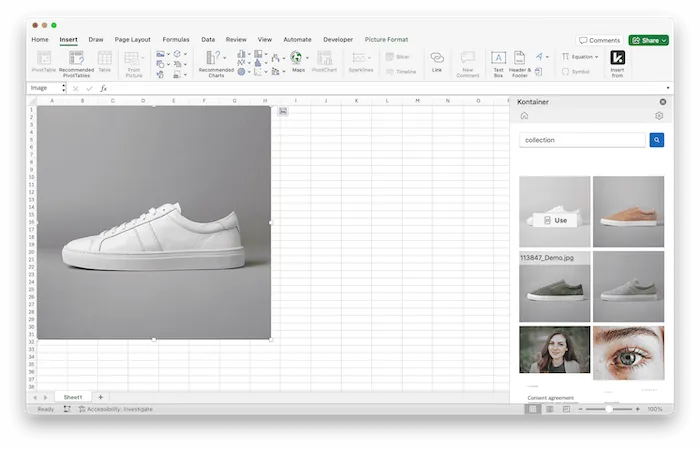
Kontainer’s Office 365 plugin makes it possible to fetch images, logos, documents, and presentation elements directly from the DAM, without having to save locally or upload manually. This allows everyone in the organization to work quickly, efficiently, and in compliance with brand guidelines.
All content is organized in Kontainer with metadata, tags, and versioning. This means that users always have access to updated and rights-secured files – directly in the Office tools where the work takes place.
Benefits
Benefits of integrating Office 365 and Kontainer DAM
✔ Insert images, logos, and files directly from Kontainer into Word, PowerPoint, and Excel
✔ Easy search through metadata and AI search in the DAM
✔ Always brand-approved, updated, and GDPR-compliant files
✔ No duplicates or version clutter
✔ Save time and increase efficiency across the organization
✔ Controlled access to files via user permissions
✔ Consistent visual identity across presentations, documents, and emails
Features
Features of the Office 365 and Kontainer integration
✔ Direct integration with Office 365 (Word, PowerPoint, Excel)
✔ Insert images, graphics, videos, and documents from DAM
✔ Automatic synchronization ensures the latest version is always available
✔ Preview, crop, and replace files directly in Office
✔ Advanced filtering and metadata search
✔ Automatic management of file expiration dates
✔ User rights management with control over access and usage
Why?
The importance of integrating Office 365 and Kontainer DAM
In many organizations, presentations, reports, and documents are central to communication – both internally and externally. The challenge is often that employees use outdated logos, images without rights, or incorrect versions of files.
With Kontainer DAM as the single source of truth, Office 365 becomes only a work tool – not a file archive. This ensures higher quality, consistency, and brand protection.
Integration with DAM saves time, reduces the risk of errors, and ensures that the organization always appears professional. At the same time, GDPR compliance and advanced access management guarantee that only relevant and approved files are used.
Use Cases
Common use cases
- Marketing teams produce PowerPoint presentations with brand-approved images.
- Communication departments write reports in Word with the correct logos and graphics.
- Sales teams create sales materials in Excel with the latest data and product information.
- International organizations ensure that all markets work with the same files – regardless of location.
Support
Links and support
Contact Kontainer’s customer service to learn more about the integration between DAM and Office 365. We are happy to help with setup, training, and best practices.
Read step-by-step guide in our Helpdesk here.
FAQ
What’s possible with the Office 365 and Kontainer integration?
With the integration, you can fetch images, logos, documents, and presentation elements directly from Kontainer into Word, Excel, and PowerPoint – without having to save files locally or upload them manually.
How the integration ensures you’re always using the latest version
The integration supports automatic synchronization, ensuring that files are always up to date. The system manages versions and makes sure users only have access to approved and current files.
Can you filter and search files via the Office plugin?
Yes — the plugin offers advanced filtering and searching based on metadata and tags (including AI search), making it easy to quickly find exactly the file you need.
How is access to files controlled when working via the Office integration?
Access management is controlled through user permissions in Kontainer. This means that only users with the appropriate privileges can view, insert, or edit specific files.
Which types of documents and scenarios are best suited for this integration?
The integration is especially useful when working with marketing materials, documents, presentations, and reports where it is important to ensure that everyone uses brand-approved images and graphics. Typical use cases include:
- Marketing teams creating PowerPoint presentations with approved images
- Communication departments writing reports in Word
- Sales teams building materials in Excel with correct product data