
Description
Professional design work directly from Kontainer
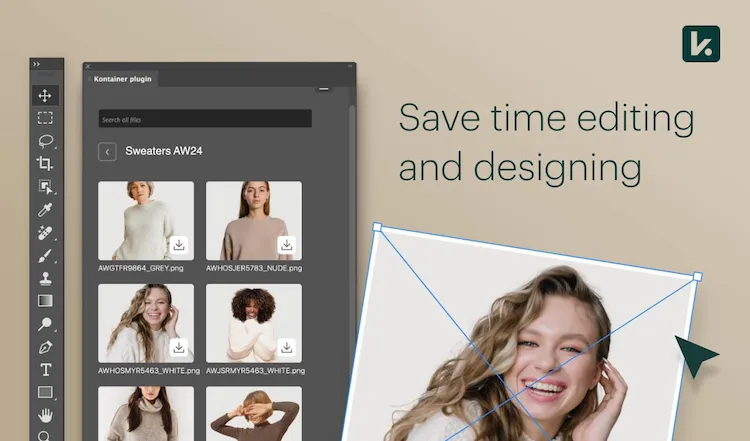
The Kontainer plugin for Adobe Photoshop connects Kontainer DAM with Adobe Photoshop so designers can drag assets directly into layouts.
Search metadata, browse folders, and insert brand-approved content while maintaining version control and consistent branding.
Benefits
Key benefits of integrating Kontainer with Adobe Photoshop
✔ Insert images, logos, and graphics directly from Kontainer into Adobe Photoshop
✔ Search via metadata and AI directly inside Adobe Photoshop
✔ Always access the latest, approved versions
✔ Eliminate manual imports and exports
✔ Protect brand consistency and avoid file mix-ups
✔ Access controlled by Kontainer user permissions
Features
Features of the Kontainer plugin for Adobe Photoshop
✔ Kontainer plugin that runs directly in Adobe Photoshop
✔ Search and preview assets from Kontainer DAM
✔ Automatic synchronization and version updates
✔ Metadata and tag-based filtering
✔ Secure access through Kontainer authentication
Why?
Why integrate Kontainer with Adobe Photoshop?
Graphic designers often juggle countless image versions and brand elements.
Integrating Kontainer eliminates wasted time switching tools and ensures all visual work stays aligned with brand guidelines.
Use Cases
Typical Use Cases
- Designers import campaign visuals and product photos directly into Adobe Photoshop.
- Marketing teams build web banners and ads using up-to-date assets.
- International offices work from the same library to ensure brand alignment.
Support
Links and Support
Contact our support team for assistance with installation, troubleshooting, or guidance on best practices for the integration.
See the complete installation guide in our Helpdesk.
Adobe, Adobe Creative Cloud and Adobe Photoshop are either registered trademarks or trademarks of Adobe in the United States and/or other countries.
FAQ
How does the Kontainer plugin for Adobe Photoshop work?
It allows you to access and insert files directly from Kontainer inside Adobe Photoshop.
Do I always get the latest file version?
Yes — Kontainer ensures automatic synchronization with the newest approved assets.
How are access rights managed?
User permissions are inherited from Kontainer, so only authorized users can view or insert assets.